

Modern businesses depend on effective communication and collaboration.
Employees work from different locations.
Teams manage projects across departments.
Customers expect faster responses.
Businesses need tools that allow people to share information, communicate, and complete tasks efficiently.
Traditional office environments are changing, and many organizations are adopting cloud-based productivity platforms to support modern workflows.
One of the widely used solutions is Microsoft 365.
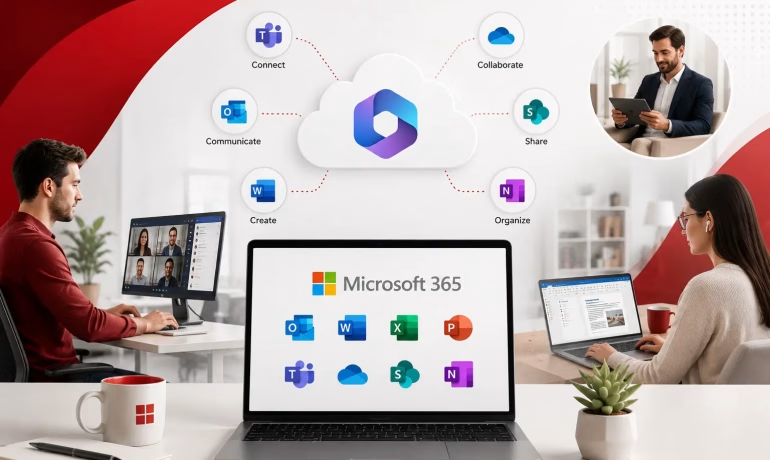
Microsoft 365 provides a collection of business applications designed to improve communication, collaboration, document management, and daily productivity.
What is Microsoft 365?
Microsoft 365 is a cloud-based productivity platform that combines familiar Microsoft applications with online collaboration features.
It includes tools for:
- Email communication
- Document creation
- File storage
- Team collaboration
- Online meetings
- Business productivity
Instead of managing separate software installations and systems, businesses can access multiple tools through one connected environment.
Organizations evaluating a Microsoft 365 server in Pakistan can select a solution based on their users, communication requirements, collaboration needs, and business operations.
Outlook Improves Professional Communication

Email remains one of the most important business communication channels.
Microsoft Outlook provides professional email management with features designed for organizations.
Businesses can manage:
- Company email accounts
- Calendars
- Contacts
- Meetings
- Task scheduling
With integrated calendar features, teams can organize meetings, manage schedules, and coordinate activities more efficiently.
Email and calendar integration is just one example of the Microsoft 365 features that support modern workplaces, particularly when employees need to coordinate work across departments and locations.
Microsoft Teams Supports Collaboration
Modern teams are often distributed across different locations.
Employees need tools that allow them to communicate quickly and work together effectively.
Microsoft Teams provides a central workspace where teams can:
- Chat
- Conduct online meetings
- Share files
- Collaborate on projects
- Manage conversations
Instead of switching between multiple platforms, employees can access communication and collaboration features in one place.
This connected approach is one of the ways Microsoft 365 improves workplace productivity by reducing unnecessary switching between separate communication and productivity tools.
SharePoint Helps Manage Business Information
As organizations grow, managing documents becomes more challenging.
Files are created by different departments.
Information needs to be stored securely.
Employees need quick access to important resources.
Microsoft SharePoint helps businesses create organized document management systems.
Companies can use it for:
- Internal portals
- Document libraries
- Knowledge sharing
- Team collaboration
This improves information accessibility while reducing confusion caused by scattered files.
OneDrive Provides Secure File Access
Employees often need access to documents while working from different locations.
Microsoft OneDrive provides cloud-based file storage that allows users to save, access, and share files securely.
With OneDrive, employees can work on documents from different devices while keeping files synchronized.
This supports flexible work environments and improves productivity.
Combined with tools such as Teams and SharePoint, OneDrive can also form part of broader Microsoft 365 solutions for secure business collaboration, helping organizations manage how employees access and share business information.
Word, Excel, and PowerPoint Support Daily Operations
Microsoft Office applications remain essential for many businesses.
Microsoft Word helps teams create documents.
Excel supports data management and analysis.
PowerPoint helps prepare presentations.
With Microsoft 365, these applications work together with cloud storage and collaboration features.
Multiple users can work on documents together, making teamwork faster and more efficient.
Security Features Protect Business Data
Businesses handle sensitive information every day.
Customer details.
Financial documents.
Internal reports.
Employee information.
Microsoft 365 includes security features that help organizations protect their data.
These may include:
- Identity management
- Access controls
- Security monitoring
- Data protection features
Strong security practices help businesses reduce risks while allowing employees to work efficiently.
Cloud Access Supports Remote Work
The workplace is becoming increasingly flexible.
Employees may work from offices, homes, or different locations.
Cloud-based tools allow teams to access applications and information without depending on a single physical workplace.
Microsoft 365 supports remote work by providing access to important business tools from anywhere with an internet connection.
Automation Improves Productivity
Businesses often spend time on repetitive activities.
Approvals.
Notifications.
Data updates.
Routine workflows.
Microsoft 365 integrates with automation tools that help organizations simplify repetitive processes.
Automation allows employees to focus on more valuable tasks while improving consistency across business operations.
Scalability Supports Growing Organizations
Business requirements change over time.
New employees join.
Teams expand.
Operations become more complex.
Microsoft 365 allows businesses to add users, adjust plans, and expand services according to their needs.
This makes it suitable for both small organizations and larger enterprises.
Choosing the Right Microsoft 365 Setup
Every business has different requirements.
Some organizations mainly need professional email.
Others require advanced collaboration, security, and productivity features.
Before selecting a Microsoft 365 solution, businesses should consider:
- Number of users
- Required applications
- Security requirements
- Collaboration needs
- Future growth plans
The right setup ensures businesses receive maximum value from their investment.
Where Chromeis Fits
Chromeis helps businesses implement Microsoft 365 solutions that improve communication, collaboration, and workplace productivity.
From Microsoft 365 setup and migration to email configuration, user management, security implementation, and ongoing support, Chromeis helps organizations create efficient digital workplaces.
The focus is on helping businesses use Microsoft 365 tools effectively while ensuring reliable and secure operations.
Final Thought
Modern businesses need more than individual productivity tools.
They need connected platforms that help employees communicate, collaborate, and manage information efficiently.
Microsoft 365 provides organizations with a complete workplace solution that supports modern business requirements.
By choosing the right setup and using its features effectively, businesses can improve productivity, strengthen collaboration, and create a more connected work environment.
Frequently Asked Questions
1. What Microsoft 365 tools are most useful for businesses?
Microsoft 365 includes several tools that support everyday business operations. Outlook helps manage professional email and calendars, Teams supports communication and meetings, OneDrive provides cloud file storage, and SharePoint helps organize documents and internal information. Word, Excel, and PowerPoint also support common business tasks such as document creation, data analysis, and presentations.
2. How can Microsoft 365 improve team efficiency?
Microsoft 365 brings communication, file sharing, document creation, meetings, and collaboration into a connected environment. Employees can communicate through Teams, share files using OneDrive or SharePoint, and collaborate on Office documents without relying on multiple disconnected platforms.
3. Is Microsoft 365 suitable for remote teams?
Yes. Microsoft 365 is designed around cloud access, allowing employees to access supported applications, files, email, and collaboration tools from different locations and devices. This makes it useful for remote, hybrid, and distributed teams.
4. Can Microsoft 365 help businesses protect their data?
Microsoft 365 provides security and access-management capabilities that can help businesses protect organizational data. Available features vary depending on the Microsoft 365 plan and configuration, so businesses should choose a setup that matches their security and compliance requirements.
5. Can Microsoft 365 scale as a business grows?
Yes. Businesses can add users and adjust Microsoft 365 subscriptions as their requirements change. This allows organizations to expand access to productivity and collaboration tools as they hire employees, create new teams, or develop more complex operations.
Similar Post
Microsoft 365 Features That Support Modern Workplaces
The workplace has changed. Employees no longer work from

How Microsoft 365 Improves Business Productivity
Running a business today means juggling more than just